Sales, inventory and operations planning
Gradora SIOP
The monthly S&OP cycle for one manufacturing site, on a Mac or iPad. Import the files your ERP already exports and leave with a dated list of what to buy and what to build, checked against your plant's hours, with every number traceable to the order or forecast behind it. Then publish the cycle as a record nobody can edit, and hand finance a meeting pack that needs no editing.
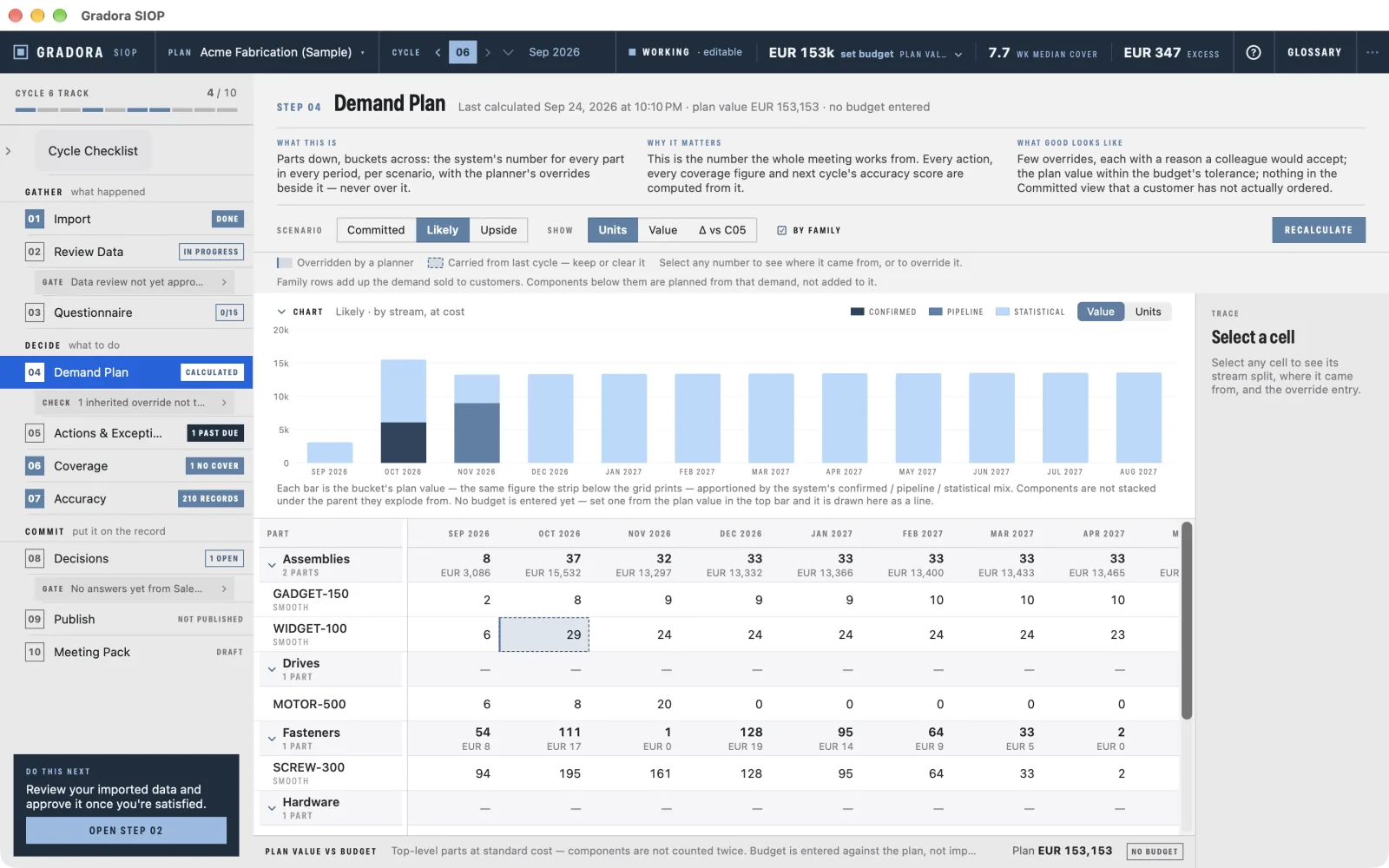
Every number traces back
Click or tap any figure to see its stream split, the rows behind it, and any override with the reason and the person who entered it. A number you cannot trace is a number you cannot defend in the meeting.
Published cycles are frozen
Publishing a cycle makes it permanently read-only, enforced in the storage layer rather than by a disabled button. Last month's plan is what last month's plan said, and next month is scored against it.
Your judgement is kept, not erased
An override never overwrites the system's forecast. It sits beside it with a reason and an author, and the change flows down the bill of materials to the parts below. Later you can see whether the planner or the algorithm was closer.
What it plans
What a planner at a small or mid-sized manufacturer needs for the monthly S&OP meeting, in one app, working from files the ERP already produces.
Demand planning and forecasting
Confirmed orders, the sales pipeline weighted by probability, and a statistical forecast for run-rate demand, in three scenarios: committed, likely and upside. Each part's demand pattern is classified first, so smooth parts get damped exponential smoothing, intermittent parts get Croston's method, and project-only parts get no statistical forecast at all.
MRP: bill of materials and netting
Demand explodes through the bill of materials with quantity per, scrap and yield, stepping back by each level's lead time. It nets against stock and open purchase orders into buy and build actions with order-by dates, minimum order quantities and multiples, past due first.
Rough-cut capacity planning
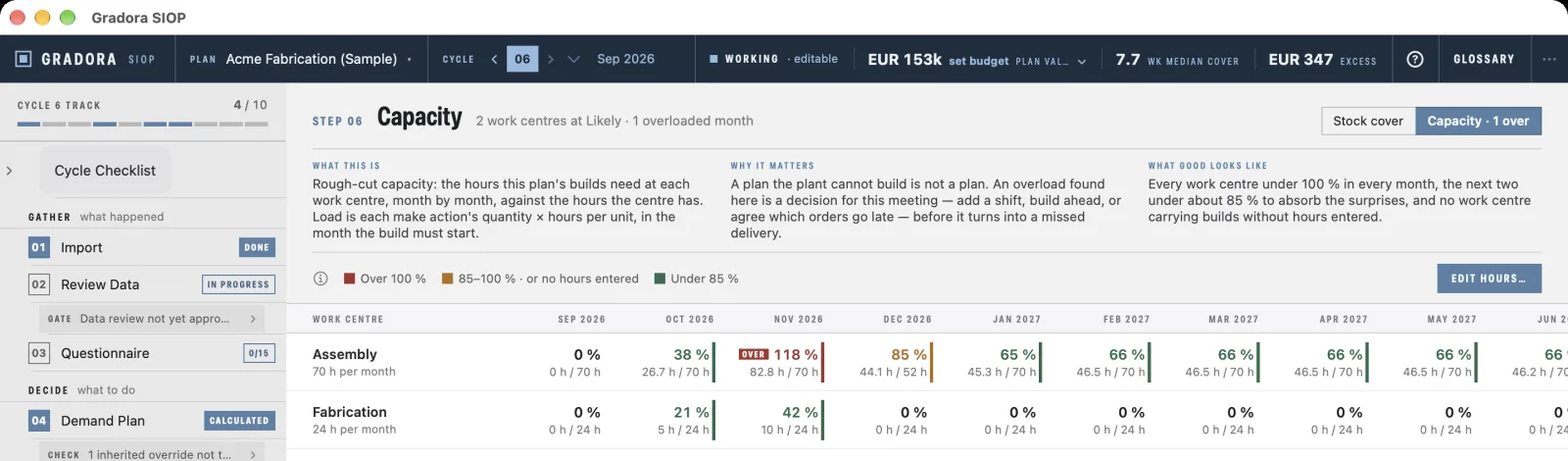
Give made parts a work centre and hours per unit, enter each work centre's hours per month, and see the plan's builds against them month by month: amber from 85 %, red over 100 %. An overload is raised as an exception and printed in the pack for the meeting to decide.
Inventory coverage, excess and obsolete
Weeks of supply per part against forward demand, with blocked stock left out. Excess and obsolete stock is valued at standard cost, so the at-risk figure finance asks about is on screen and in the pack.
Forecast accuracy
Every published forecast is scored as the actuals arrive, at the lag you choose, on nine metrics: WAPE by value and by volume, MAPE, sMAPE, MAE, RMSE, bias, MASE against a naive baseline, and forecast attainment. Forecast value added shows whether the overrides helped, and the headline is read out in plain words.
The S&OP meeting pack
A PDF for the meeting and an Excel workbook with live formulas, so anyone in finance can re-perform a figure: the chair's summary, demand by scenario, actions, exceptions, capacity, coverage, accuracy, decisions and each department's answers.
New in version 1.1
A capacity check against the plant. Made parts carry a work centre and hours per unit, as two optional columns in the item master or typed in the grid. Each work centre gets its hours per month, with any month set differently for a shutdown or overtime. The builds the plan asks for load the month each one must start, and nothing is rescheduled behind your back: the meeting decides whether to add hours, build ahead or let an order slip.
Overrides flow down the bill of materials. Raise a finished good and the components and builds below it are planned for the difference, in the same scenario.
Easier to learn. The accuracy headline is read out in plain words, and the Do this next guide walks a new planner through the whole cycle, from the first import to the meeting pack.
What it looks like
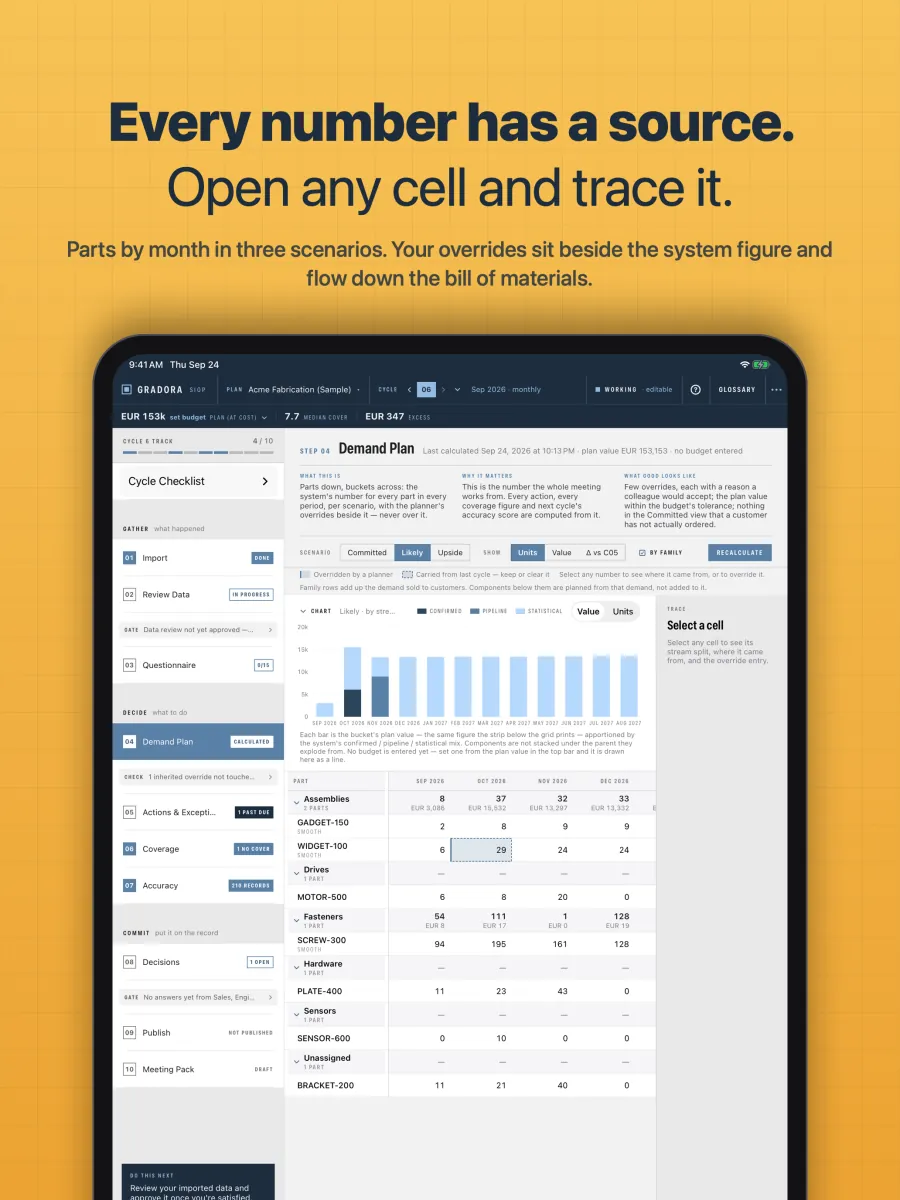
Demand plan 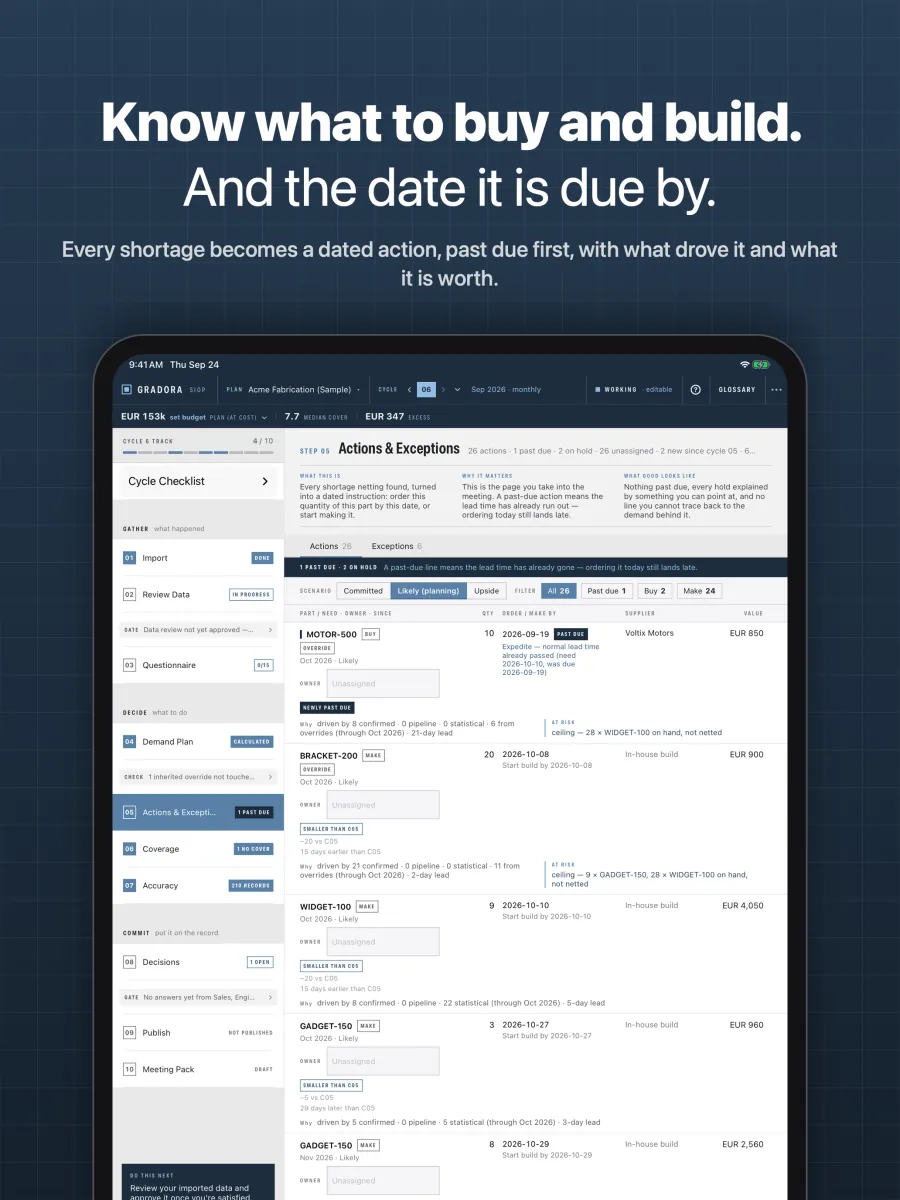
Actions and exceptions 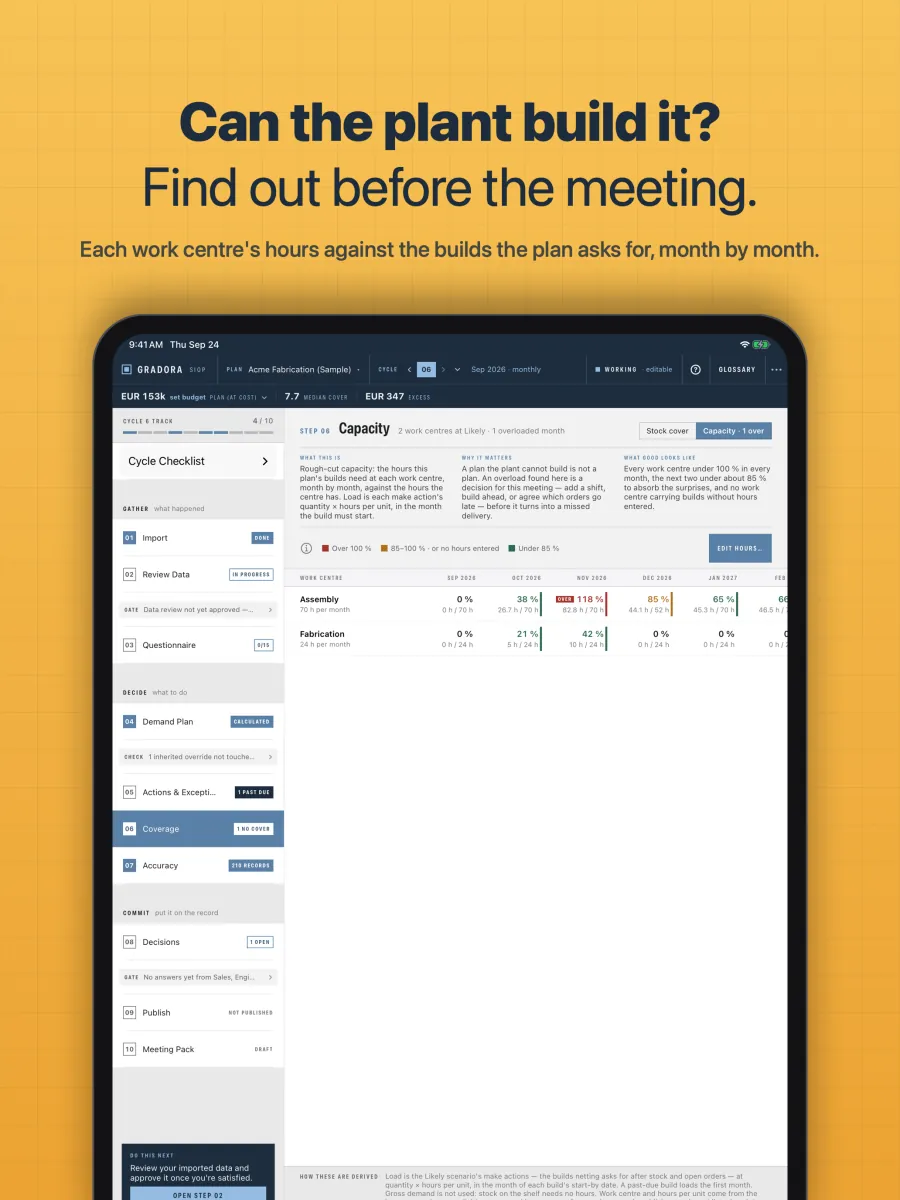
Capacity 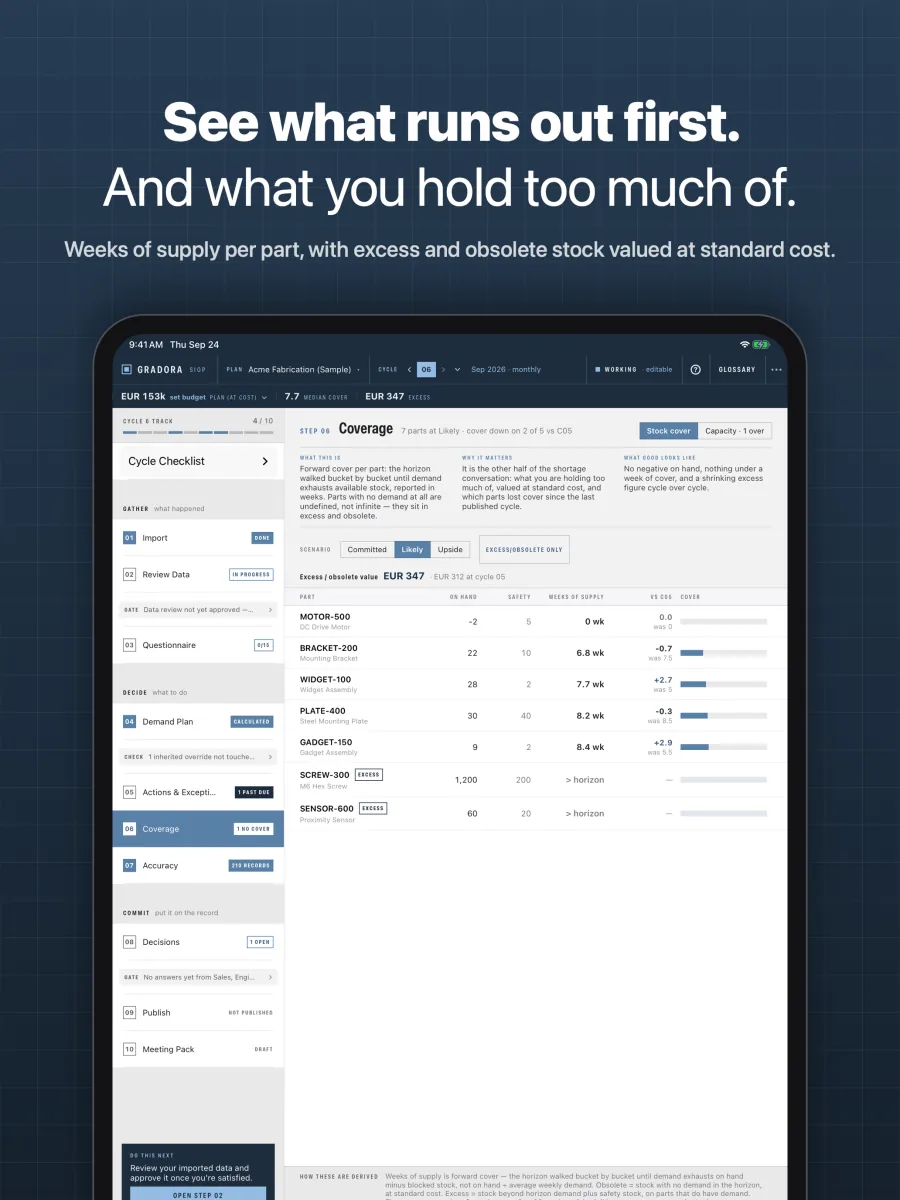
Coverage 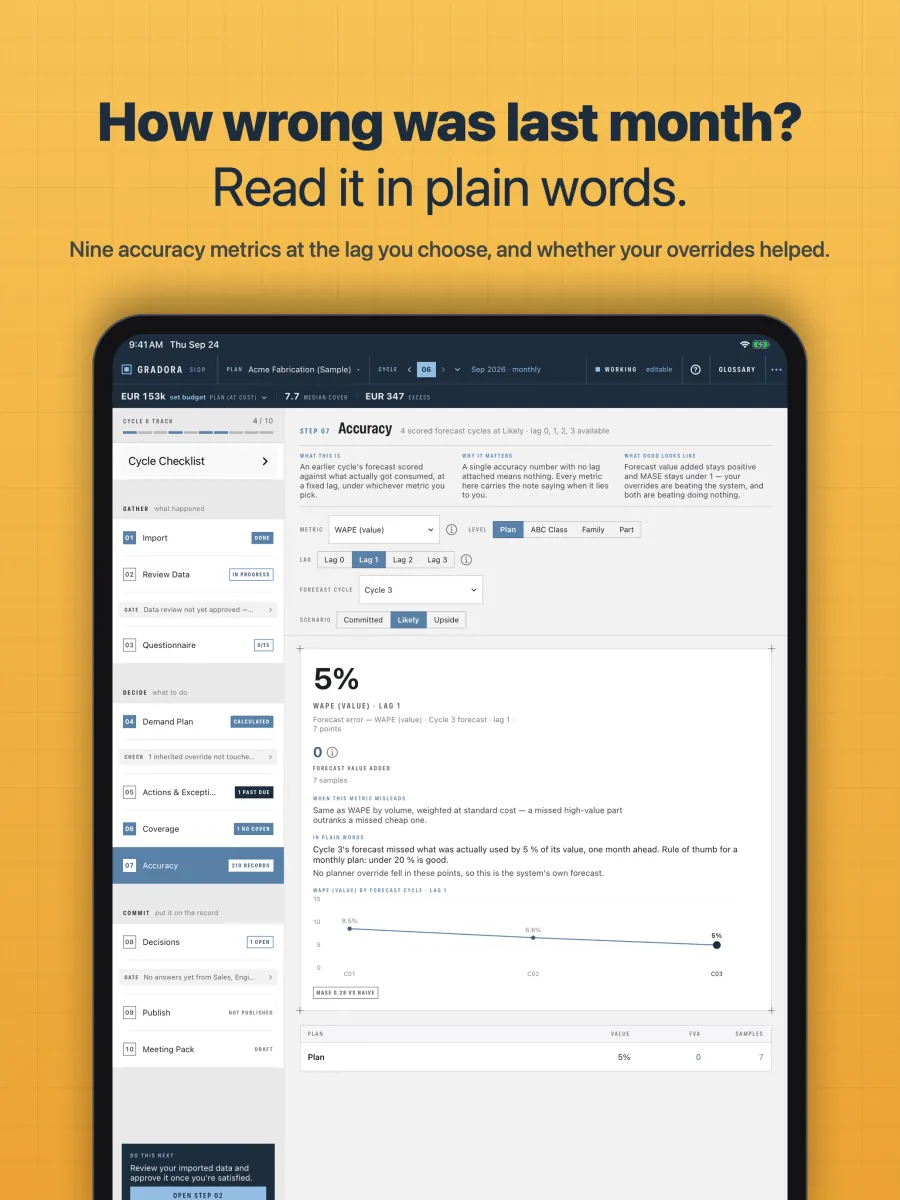
Forecast accuracy 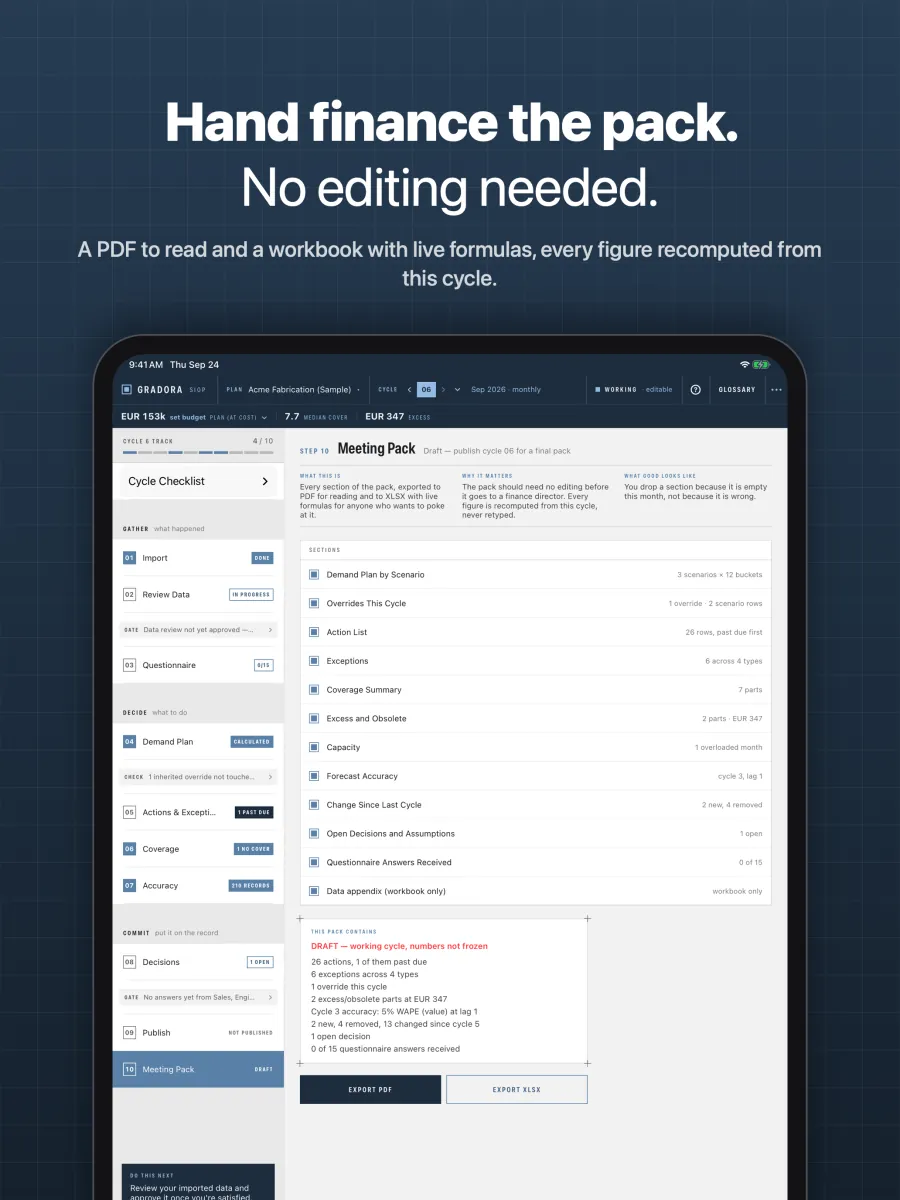
Meeting pack
How a cycle runs
A plan is one site: its bucket size, its horizon, its currency and its history. A cycle is one run of the process, usually one month. Every cycle starts working and ends published. Ten steps, in the order the process needs them, grouped into the three phases of a textbook S&OP month.
| Phase | Steps |
|---|---|
| Gather |
Import seven files from the ERP and CRM. Review and correct the rows in place. Ask six departments what changed. |
| Decide |
A demand plan across three scenarios with your overrides beside the system figure. A buy-and-build action list with order-by dates, past due first. Coverage in weeks of supply, excess and obsolete stock at standard cost, and each work centre's load against its hours. Forecast accuracy on nine metrics. |
| Commit |
Decisions and assumptions with owners and due dates. Publish, which freezes the cycle for good. A meeting pack as PDF and as a workbook. |
Gates between the phases report what is outstanding: a data review not approved, departments that have not answered, inherited overrides not re-affirmed. Publishing never silently skips one. Whatever is missing is acknowledged by name with a reason, and that acknowledgement prints on the cover of the pack.
The next cycle copies forward the last one's overrides and open decisions, flagged as inherited, so nothing is retyped and nothing is kept without being deliberately re-affirmed.
What goes in, and what it is not
The seven files
Item master, bill of materials, opportunities, confirmed orders, inventory, open purchase orders and consumption history. CSV, in whatever dialect your ERP writes: the app detects the encoding, the delimiter, the decimal convention and the date order, and refuses to guess on an ambiguous value. The item master can also carry each made part's work centre and hours per unit, for the capacity check.
Columns are mapped once per plan and remembered, so cycle two is a five-minute job. Nothing is written until you have seen the preview: accepted rows, rejected rows with the reason, and a hygiene block naming parts with a zero lead time, no supplier, or an order multiple that contradicts the minimum order quantity.
If those extracts do not exist yet, the app writes you a workbook with one sheet per file, every column explained, to hand to whoever writes the ERP report.
What it is not
Being clear about this saves everyone a wasted evaluation.
- One planner, one machine. No sharing, no roles, no multi-user review, no consensus tracking per department. If several planners each need it, each buys a seat.
- Rough-cut capacity, not scheduling. One work centre and one hours-per-unit figure per made part. No routings, no finite scheduling, and nothing is moved automatically. No BOM effectivity dates, phantom assemblies or alternate parts either.
- No ERP connection. It reads files you export. It does not talk to your ERP and never will, because that is exactly the network access it refuses to have.
- CSV in, not Excel in. The app writes XLSX; reading it is deferred until CSV has had a season of real use.
- English only, and one light interface with no dark mode.
There is also a tested ceiling on plan size. Read how big a plan can be before you commit to a site with a very large item master.
What it costs
With a free trial, and volume pricing for organisations buying several seats.
The whole app is free to use on the sample site. Every screen, every calculation and five published cycles of history, with no time limit and no account. A subscription unlocks three things: importing your own data, publishing a cycle, and exporting the meeting pack. Nobody should buy a planning tool they have not first driven.
Questions planners ask
What is SIOP, and how is it different from S&OP?
SIOP, sales, inventory and operations planning, is S&OP with inventory named in the title. Both mean the monthly process in which sales, operations, purchasing and finance agree one plan for demand, supply and stock. Gradora SIOP runs the planner's side of that month for one site: the data, the plan, the actions and the pack the meeting works from.
Is Gradora SIOP an MRP system?
It does the MRP calculation: demand explodes through the bill of materials with scrap, yield and lead-time offsets, nets against stock and open purchase orders, and becomes dated buy and build actions with minimum order quantities and multiples. It is not an ERP. It does not raise purchase orders or hold your transactions. It reads what your ERP exports and hands the planner the list to act on.
Does it connect to my ERP?
No, deliberately. It reads seven CSV files that an ERP or CRM can produce as reports: item master, bill of materials, opportunities, confirmed orders, inventory, open purchase orders and consumption history. Columns are mapped once per plan and remembered. If the reports do not exist yet, the app writes a template workbook to hand to whoever builds them.
Can I try it before I pay?
Yes. The app is free to download, and the sample site inside it has five published cycles of history. Every screen and every calculation works on it, with no time limit and no account. A subscription, which starts with a free trial, unlocks importing your own data, publishing a cycle and exporting the meeting pack.
Does my planning data leave the device?
No. There is no server, no account, no analytics and no crash reporting. The only network request the app makes is the App Store's subscription check, which carries no planning data. Plans move between a Mac and an iPad as an archive file you export and import yourself. The privacy policy has the detail.
How large a site can it plan?
It is measured to run a year of monthly cycles at 500 active parts on an iPad Air, which is roughly 65 sellable products once every component is counted. Larger plans still work, with a warning, and a Mac goes considerably further. Very large sites keep one plan per product family. How big a plan can be explains the limit.
Does it plan weekly as well as monthly?
Yes. A plan's buckets are weekly, fortnightly or monthly. The size is chosen when the plan is created and fixed at the first publish, so every later cycle is scored on the same calendar.